
Design engineer, the job I was doing before it had a name
Ten years switching between designer and front-end, always feeling like I had the wrong title. What a design engineer is, what's expected from one and why I think this profile matters more now with AI.
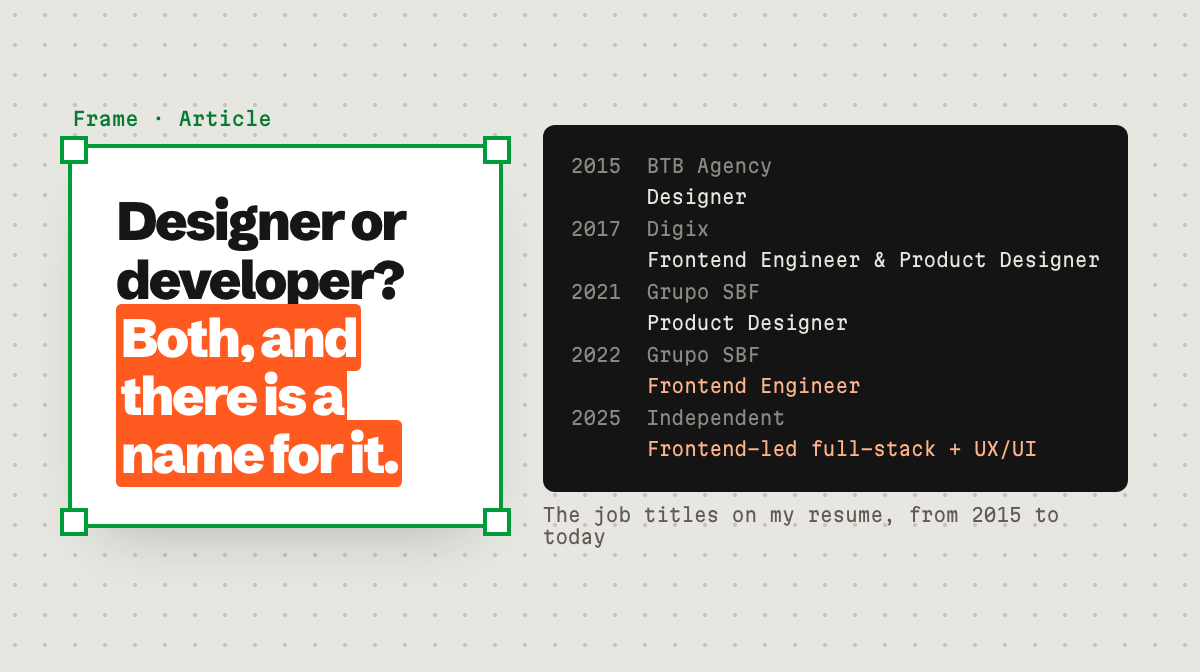
For years I had a hard time answering a simple question: "are you a designer or a developer?"
Looking at my resume, you can see why. I started as a designer at an agency, doing websites, graphic pieces, video, photography and art direction. At Digix I was a front-end engineer and a product designer at the same time. At Grupo SBF I came in as a product designer and left leading the front end of Painel SBF. Today, at Grupo Ser, I'm the only developer on the project and I also handle the UX and the interface.
Every time I changed titles it felt like I was leaving the other half behind, and it took me a while to stop apologizing for not fitting in one box. What I didn't know was that this work already had a name.
What a design engineer is
The definition I like best is Vercel's, and they have a whole team of them. They describe design engineers as people who blend aesthetic sensibility with technical skills, understand the problem deeply, and design, build and ship a solution on their own.
Some people think it means knowing a bit of Figma and a bit of React. For me what defines the job is not needing a handoff, in other words, the same person who decides the spacing writes the CSS, so the spacing shows up on screen the way it was planned.
Where it showed up in my work
At Digix, the products used React, Angular, Aurelia, Knockout, Vue and frameworks in Java and C#, so a design system (the library of components and visual rules the products share) built in one of those didn't work for the others. The way out was to build the system in plain HTML, CSS and JavaScript, with CSS variables any product could use. I see that as a design decision and an engineering decision at the same time, and I think a designer alone wouldn't have proposed it, and a developer alone maybe wouldn't even have cared.
At Grupo SBF I came from design and ended up writing the plan to move hundreds of features out of a legacy admin and into a single platform. The plan covered architecture, permissions per brand and audit logs, and that plan is why they asked me to lead the front end of the project.
At Grupo Ser, the same person designs the course page, writes the component, takes care of SEO and measures performance. There's no handoff meeting, where the design goes to whoever is going to code it, because there's nobody to hand it to.
What's expected from someone in this role
From what I see in job posts and in my own work, it comes down to three things:
- Taste that turns into code. Being able to say why a screen is off and fix it in the file yourself, without opening a ticket for someone else.
- Interaction details. Transitions, loading states, keyboard focus, what happens when the connection drops. I think that's where a product feels expensive or cheap.
- Thinking in systems. Components, tokens and written rules, so the next one to touch it, a person or an AI, doesn't invent a new style.
Why I think it matters more now
This is my opinion, I don't have research on it. With AI, generating a screen got cheap, and what got expensive is looking at the generated screen and knowing what's wrong with it: the hierarchy that doesn't work, the spacing that changes from one section to the next, the component that doesn't follow the system.
If someone only designs, they need someone else to implement the fix, and if they only code, a lot of the time they don't even see the problem. Since I do both, I can read what the AI delivered and fix it in the same place.